Procurement is where UAE restaurant margins are made or lost before a single dish is cooked. Supplier prices shift without warning, invoices arrive in paper and WhatsApp photos, and a short-delivery that goes unnoticed at goods receipt becomes an overpayment that never comes back. TajerGo, the UAE-built restaurant operating system that combines POS, inventory, purchasing, Khata, AI insights, and VAT compliance in one platform, gives restaurants a structured procurement workflow — from purchase order through goods receipt and invoice matching — with OCR that reads supplier invoices automatically and price-tracking that flags every unexplained increase.
What purchasing and supplier features does TajerGo include?
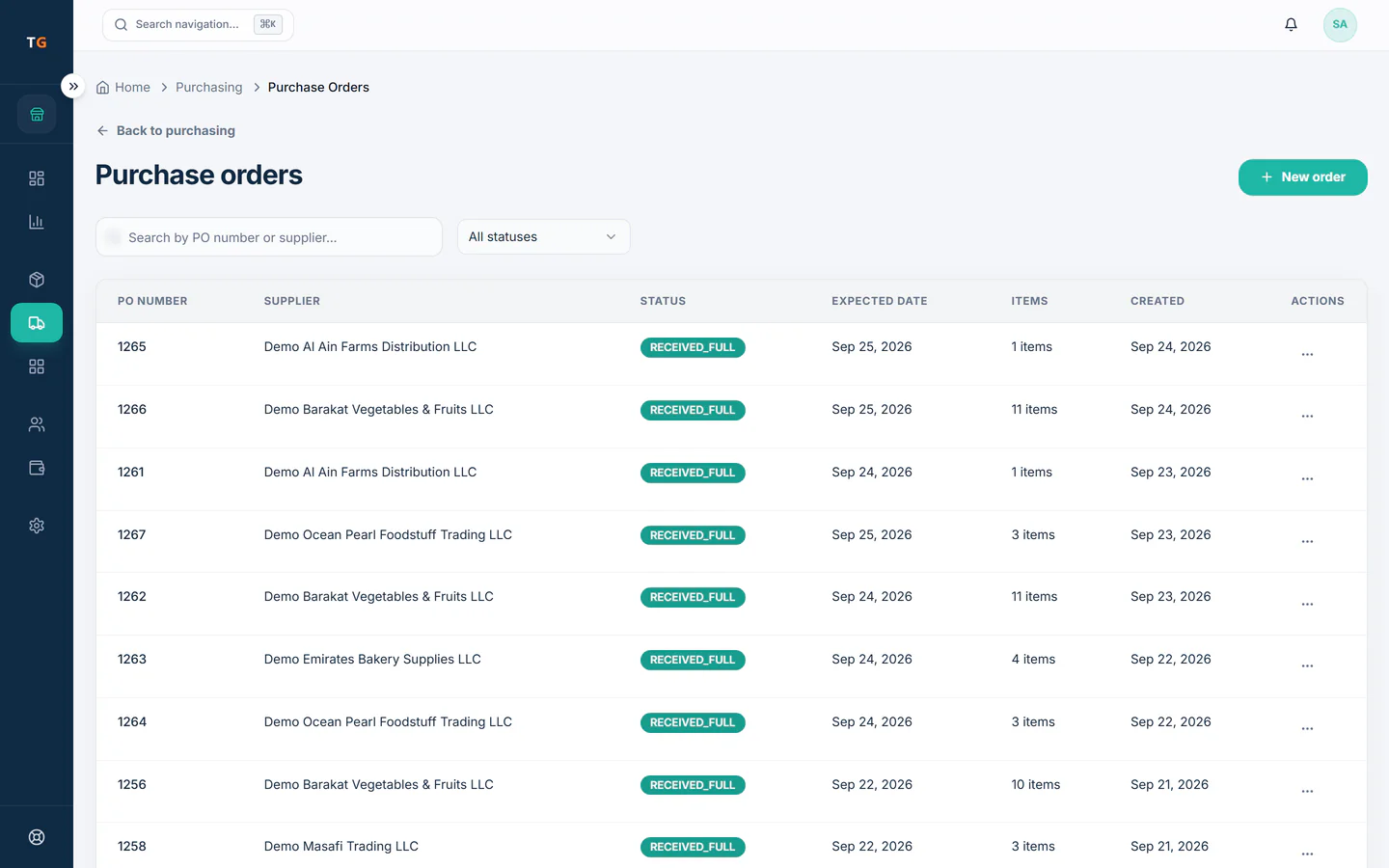
- Purchase Orders (PO)Create, send, and track purchase orders through their full lifecycle — drafted, sent, acknowledged, partially delivered, and closed. Each PO records the supplier, ordered items, quantities, agreed unit prices, and expected delivery date. Buyers always have a reference document, and the PO is the anchor for goods-receipt and invoice matching downstream.
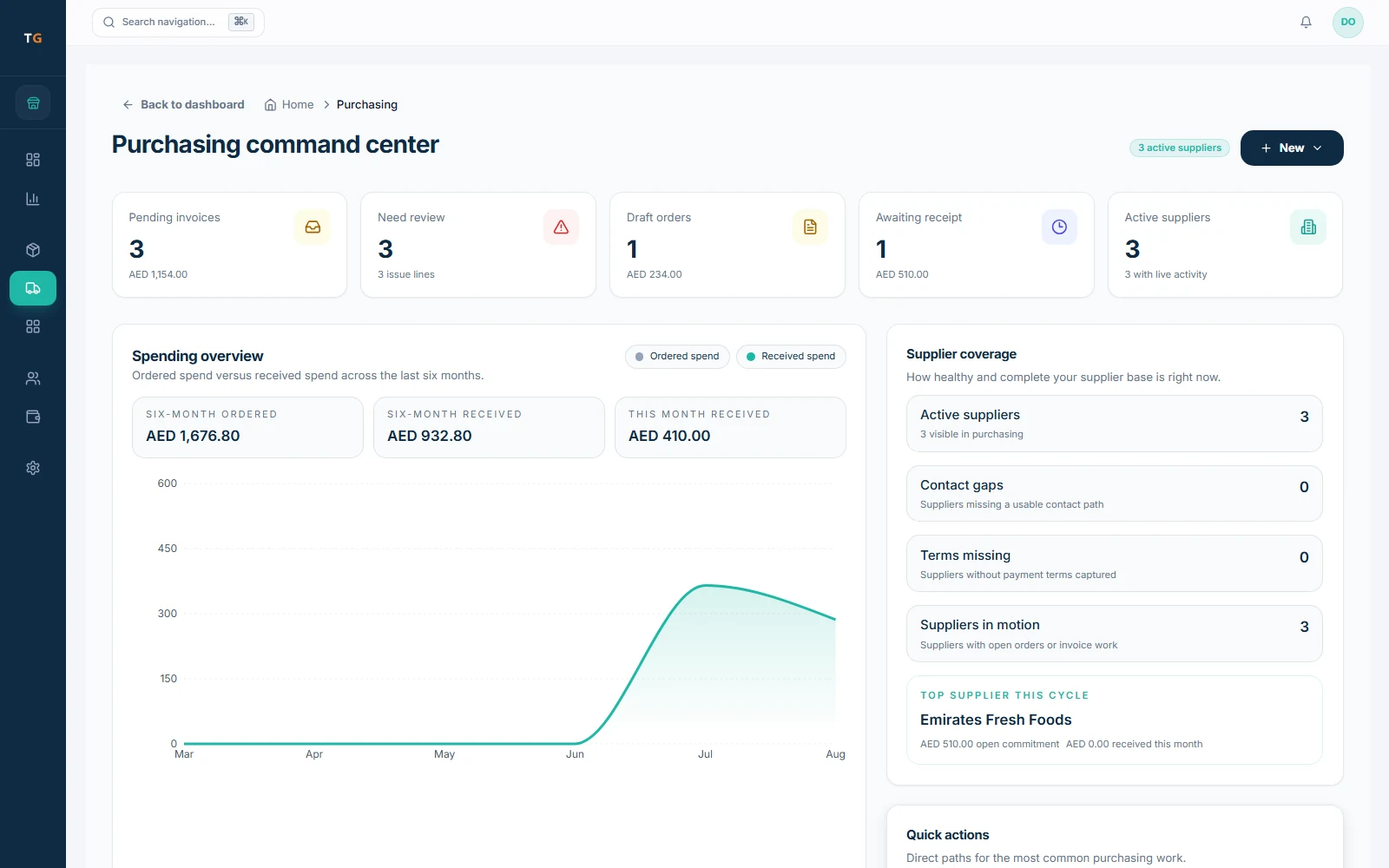
- Supplier ManagementA supplier directory with contact details, agreed payment terms, per-supplier product catalogs, and branch assignments (so a branch only sees its relevant suppliers). All supplier history — orders, deliveries, price changes, and invoices — is accessible from the supplier record. No more searching through emails to find a supplier's last delivery price.
- Supplier Price ComparisonCompare prices across suppliers for the same ingredient or product. When a supplier quotes a price, TajerGo shows what other active suppliers have previously charged for the same item, making it straightforward to identify whether a new quote is competitive or inflated.
- Goods Received Notes (GRN)When a delivery arrives, create a GRN against the open PO — recording what actually arrived, in what quantities, and at what condition. The GRN updates inventory stock levels immediately and creates the paper trail for matching against the eventual invoice.
- 3-Way Matching (PO / GRN / Invoice)The system automatically compares three documents: the original purchase order (what was ordered), the goods received note (what arrived), and the supplier invoice (what is being charged). Any mismatch — a quantity on the invoice greater than what was received, or a price higher than the PO agreed price — is flagged before payment is authorised. This is the primary control against overpayment and invoice fraud.
- OCR Invoice ScanningPhotograph or upload a supplier invoice — including handwritten ones and those sent as WhatsApp images — and the AI extracts line items, quantities, unit prices, totals, supplier name, and invoice number into structured data. The extracted data is then available for 3-way matching without manual re-keying. Errors caught at data entry rather than at reconciliation.
- Invoice Change MonitoringTajerGo monitors supplier invoices for price changes relative to the agreed PO price and prior invoices from the same supplier. When an invoice arrives with a line-item price that differs from what was ordered or from the last invoice, the system flags the change with the AED difference so it can be queried with the supplier before payment.
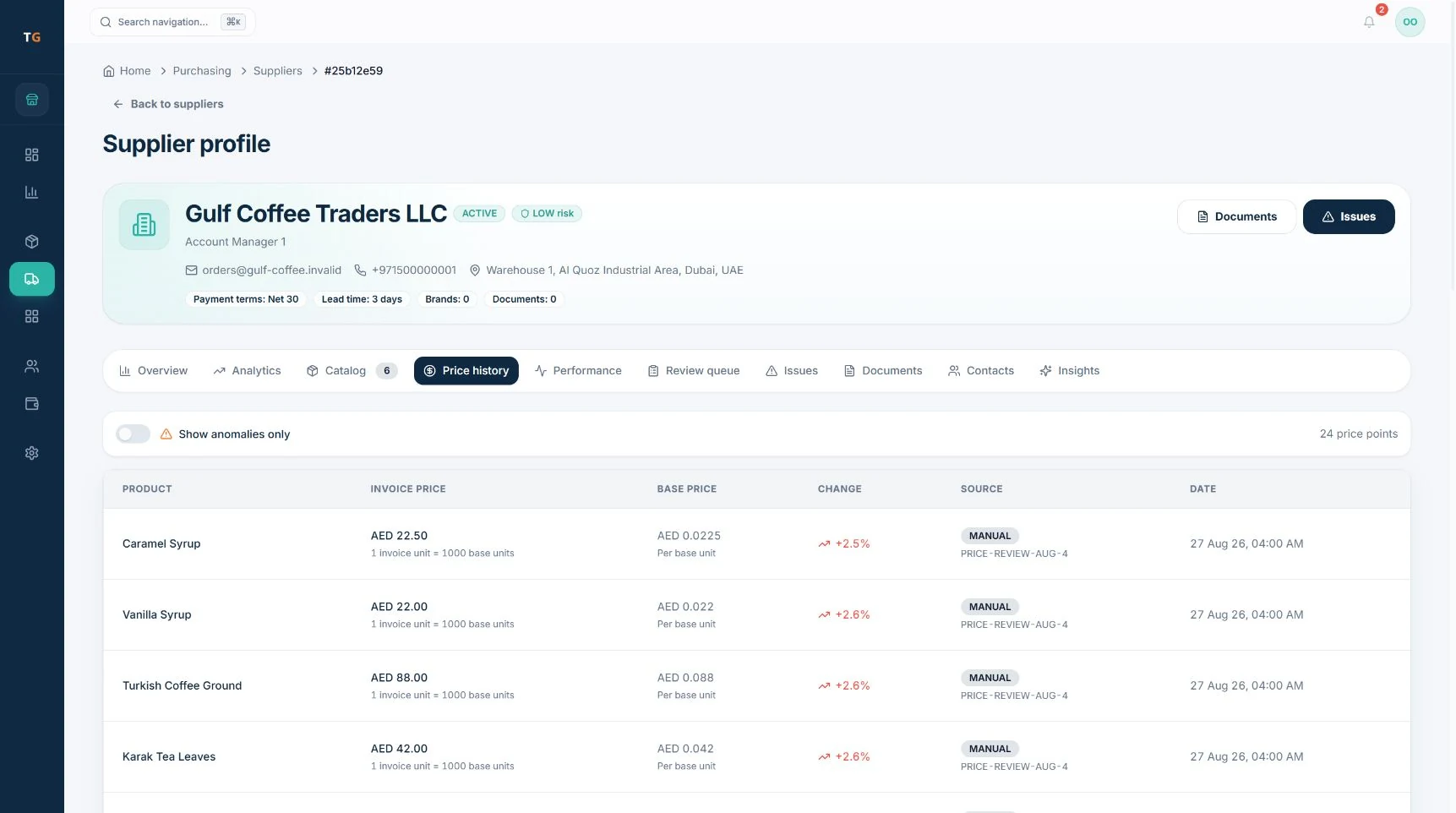
- Supplier Price TrackingTracks unit price history per product per supplier over time. A price that has crept up by 8% across six months — below the threshold of a single obvious jump — is visible in the price history chart. This data supports the supplier price comparison view and feeds the Supplier Intelligence analysis.
- Procurement WorkflowThe full procurement sequence — PO creation, supplier acknowledgement, GRN on delivery, invoice receipt, OCR extraction, 3-way matching, and payment authorisation — operates as a connected workflow in TajerGo rather than a series of disconnected steps across email, paper, and spreadsheet. Each stage records the user, timestamp, and outcome so there is a complete audit trail from order to payment.
How purchasing and supplier management works in TajerGo
From order to payment: the procurement sequence
| Stage | What happens in TajerGo |
|---|---|
| 1. Create PO | Buyer selects supplier, adds items with quantities and agreed prices, sends PO |
| 2. Delivery arrives | Receiving staff creates a GRN — records what actually arrived against the PO |
| 3. Invoice arrives | Photograph or upload the supplier invoice; OCR extracts line items automatically |
| 4. 3-way match | System compares PO vs GRN vs Invoice — flags any quantity or price discrepancy |
| 5. Approve or query | If matched: approve for payment. If flagged: query the supplier with the discrepancy evidence |
This sequence replaces the common UAE restaurant pattern of verbal orders, paper invoices filed in a folder, and overpayments discovered only when the accountant reconciles at month-end.
OCR invoice scanning: how it works
A supplier delivers an invoice on paper or sends a photo on WhatsApp. The buyer opens TajerGo Purchasing > Invoices, taps to add a new invoice, and photographs or uploads the document. The AI OCR engine reads the invoice — including invoices in Arabic — and extracts each line item: product description, quantity, unit price, and line total, along with the invoice number, date, and supplier name.
The extracted data is presented for confirmation before committing, so a buyer can correct any line the OCR misread (useful for handwritten invoices or poor-quality photos). Once confirmed, the structured invoice data is stored and immediately available for 3-way matching against the open GRN and PO.
The practical outcome is that an invoice that previously required 15 minutes of manual keying is processed in under two minutes, with no transcription errors entering the system.
Supplier price tracking and intelligence
TajerGo records the unit price on every GRN and confirmed invoice per supplier per product. The supplier price history chart shows price over time, highlighting when and by how much each price changed. The Invoice Change Monitoring layer compares each new invoice line to the PO agreed price and to the last invoice from the same supplier — and raises a flag when they diverge.
A UAE restaurant buying chicken from a supplier weekly can see, in one chart, whether the price has drifted upward across six months of deliveries, giving concrete data for a renegotiation conversation.
3-way matching: what it catches
- Quantity mismatch (GRN vs Invoice): Supplier invoices for 20 kg of tomatoes; GRN recorded only 17 kg as received. The 3-kg overpayment is flagged before the invoice is approved.
- Price mismatch (PO vs Invoice): PO agreed AED 12.50 per kg; invoice charges AED 13.80 per kg. The system flags the AED 1.30 per-kg discrepancy and the total overcharge for the order.
- Line items on invoice not on PO: Invoice includes a product not in the original order — flagged as an unapproved charge.
All flagged mismatches require a resolution (query to supplier, credit note, or authorised override with reason) before the invoice can be marked as approved for payment.
Who is this for?
- UAE restaurant owners who currently order verbally or by WhatsApp message and have no formal PO process, and want to stop paying for short deliveries and price increases they did not agree to.
- Restaurant operations managers responsible for cost of goods who need a systematic way to catch discrepancies between what was ordered, what arrived, and what was invoiced.
- Multi-branch restaurant groups where procurement is centralised but deliveries happen at individual branches, and head office needs visibility of what each branch received and was charged.
- Cloud kitchens and franchise operations where ingredient cost control is critical to model economics and where supplier price creep can erode contribution margins across multiple concepts.
- Restaurant accountants and controllers who need a clean, timestamped procurement audit trail for VAT input tax claims and FTA compliance.
Why it matters for UAE restaurants
Supplier invoice disputes are common in UAE F&B. Short deliveries, unauthorised price increases, and items billed but not delivered are frequent friction points between restaurants and their suppliers. Without a formal GRN and matching process, a restaurant has no documentary evidence for a dispute — and tends to pay rather than argue. TajerGo's 3-way matching gives the buyer evidence at the moment of invoice, not weeks later.
VAT input tax recovery depends on accurate, compliant supplier invoices. OCR-extracted and structured invoice data makes it straightforward to verify that every purchase invoice carries the supplier's TRN, the correct VAT amount, and the required fields for an FTA-valid tax invoice. Invoices that are missing required fields are identified before payment, while the window to request a corrected invoice is still open.
Supplier price volatility in the UAE — driven by import costs, fuel surcharges, and seasonal availability — means that ingredient prices move frequently. Tracking those movements in TajerGo creates a data record that restaurant owners can reference when renegotiating annual contracts or selecting between suppliers for a category.
Food cost as a percentage of revenue is the metric that determines whether a UAE restaurant is profitable. Procurement discipline — ordering to a PO, confirming a GRN, and matching the invoice — is the operational habit that keeps food cost percentages predictable. TajerGo embeds that discipline into the workflow so it happens consistently, not only when the accountant has time to chase it.
Frequently asked questions
What is restaurant procurement?
Restaurant procurement is the process of ordering ingredients and supplies from suppliers, receiving them, and verifying that what arrived and what is invoiced matches what was ordered. A structured procurement process includes purchase orders (so the price and quantity are agreed in writing before delivery), goods received notes (so the actual delivery is documented), and invoice matching (so overcharges are caught before payment). TajerGo covers all three stages in one connected workflow.
How do I create a purchase order in TajerGo?
In the admin portal, open Purchasing > Purchase Orders and create a new PO. Select the supplier from your supplier directory, add the products and quantities you want to order, confirm the agreed unit prices, and save. TajerGo generates a formatted PO document that can be sent to the supplier directly. The PO stays open and trackable until a GRN is raised against it at delivery, and it becomes the reference document for invoice matching.
What is 3-way matching and why does it matter?
3-way matching compares three documents — the purchase order (what you agreed to buy), the goods received note (what the supplier actually delivered), and the supplier invoice (what the supplier is asking you to pay). When all three agree, the invoice is clean. When they do not agree — because the invoice quantity is higher than the GRN, or the price is higher than the PO — the discrepancy is flagged before you pay. For UAE restaurants processing multiple supplier invoices each week, 3-way matching is the systematic control that prevents overpayment from becoming a routine cost of doing business.
How does OCR invoice scanning work in TajerGo?
You photograph or upload the supplier invoice in TajerGo Purchasing > Invoices. The AI reads the document — including Arabic-language invoices and images sent as WhatsApp photos — and extracts each line item into structured data: product, quantity, unit price, line total, invoice number, date, and supplier name. You review and confirm the extracted data (correcting any OCR misreads), then commit. The confirmed invoice is stored and immediately matched against the open GRN and PO for that delivery. The process takes under two minutes and eliminates manual data entry errors.
How do I catch supplier overcharging in TajerGo?
TajerGo catches overcharging through two mechanisms working together. First, 3-way matching compares the invoice price and quantity against what was agreed on the PO and confirmed on the GRN — any line where the invoice charges more than the PO agreed price or more than the GRN confirmed quantity is flagged with the AED discrepancy before payment approval. Second, Invoice Change Monitoring tracks price history per supplier per product and flags when a new invoice carries a price that differs from the previous invoice from that supplier, even if the PO was not formally in place. Both alerts present the evidence needed to query the supplier with specific figures rather than a general dispute.
Can TajerGo compare prices between suppliers?
Yes. The Supplier Price Comparison feature lets you view what different active suppliers have charged for the same ingredient or product across recent orders and invoices. When evaluating a new quote or deciding which supplier to use for a product category, you can see the price history for each supplier side by side. This supports negotiation with data rather than memory.
Does TajerGo track supplier price changes over time?
Yes. Supplier Price Tracking records the unit price on every confirmed GRN and invoice per supplier per product and displays it as a price history over time. Price increases that are too small to trigger immediate concern on any single invoice are visible as a trend across a longer period. The Supplier Intelligence view in the admin portal surfaces these trends and flags suppliers whose prices have increased significantly, so restaurant owners have the data for annual renegotiations.
---
---
Want the deep-dive guide? Read the related TajerGo guide for the full walkthrough.
Explore more TajerGo features
Every feature, one flat price
TajerGo is AED 499 per branch with every feature included — no upgrade gatekeeping.
Book a demoSee pricing