Restaurant inventory in the UAE carries risks that generic stock software was never designed for — Ramadan demand spikes, multi-branch operations across emirates, food-safety expiry obligations, and the AED food cost that quietly eats margins every week. TajerGo, the UAE-built restaurant operating system that combines POS, inventory, purchasing, Khata, AI insights, and VAT compliance in one platform, gives every restaurant a live, auditable view of stock from the moment an ingredient arrives to the moment it becomes a dish sold at the till.
What inventory features does TajerGo include?
- Real-Time Stock TrackingTracks on-hand quantities for every ingredient and finished product, updating instantly when a sale is rung, a stock count is committed, a purchase is received, or a transfer moves stock to another branch. You always see today's quantity, not last night's.
- Ingredient and Finished-Goods TrackingManages both raw ingredients (flour, chicken, oil) and finished or semi-finished goods in the same inventory. Recipes link finished items to their ingredients so each sale at the POS automatically deducts the correct raw-material quantities.
- Stock Movement LogRecords every change to a stock level — purchase receipt, sale deduction, manual adjustment, transfer out, transfer in, wastage, and audit variance — with a timestamp and user. Creates a full, auditable history.
- Wastage TrackingLog spoilage, spills, contamination, theft, or expired stock with a reason code and quantity. Each logged wastage reduces the on-hand figure and feeds into Ghost Inventory analysis and cost reports so you can see what food waste is actually costing in AED.
- Par Levels and Low-Stock AlertsSet a reorder point (par level) and a safety-stock buffer per product. When on-hand stock falls to or below the par level, the system raises a low-stock alert visible on the dashboard, the Stock Shield widget, the POS Stock Health Strip, and the WhatsApp Daily Digest — before you run out, not after.
- Branch InventoryEach branch holds its own independent stock position. The admin dashboard shows stock per branch so a head-office manager can compare on-hand quantities across all locations without visiting each site.
- Stock Transfers (Branch-to-Branch)Move stock from one branch to another with a tracked transfer record that debits the sending branch and credits the receiving branch. Prevents over-ordering at one outlet when a neighbouring branch has surplus.
- Stock Take / Variance (Stock Audit)Start a physical stock count, enter the counted quantities, and commit. The system computes the variance between expected (system) quantity and counted quantity, adjusts on-hand stock, and logs the discrepancy for audit. Supports section-by-section counting so a full count does not have to happen in one go.
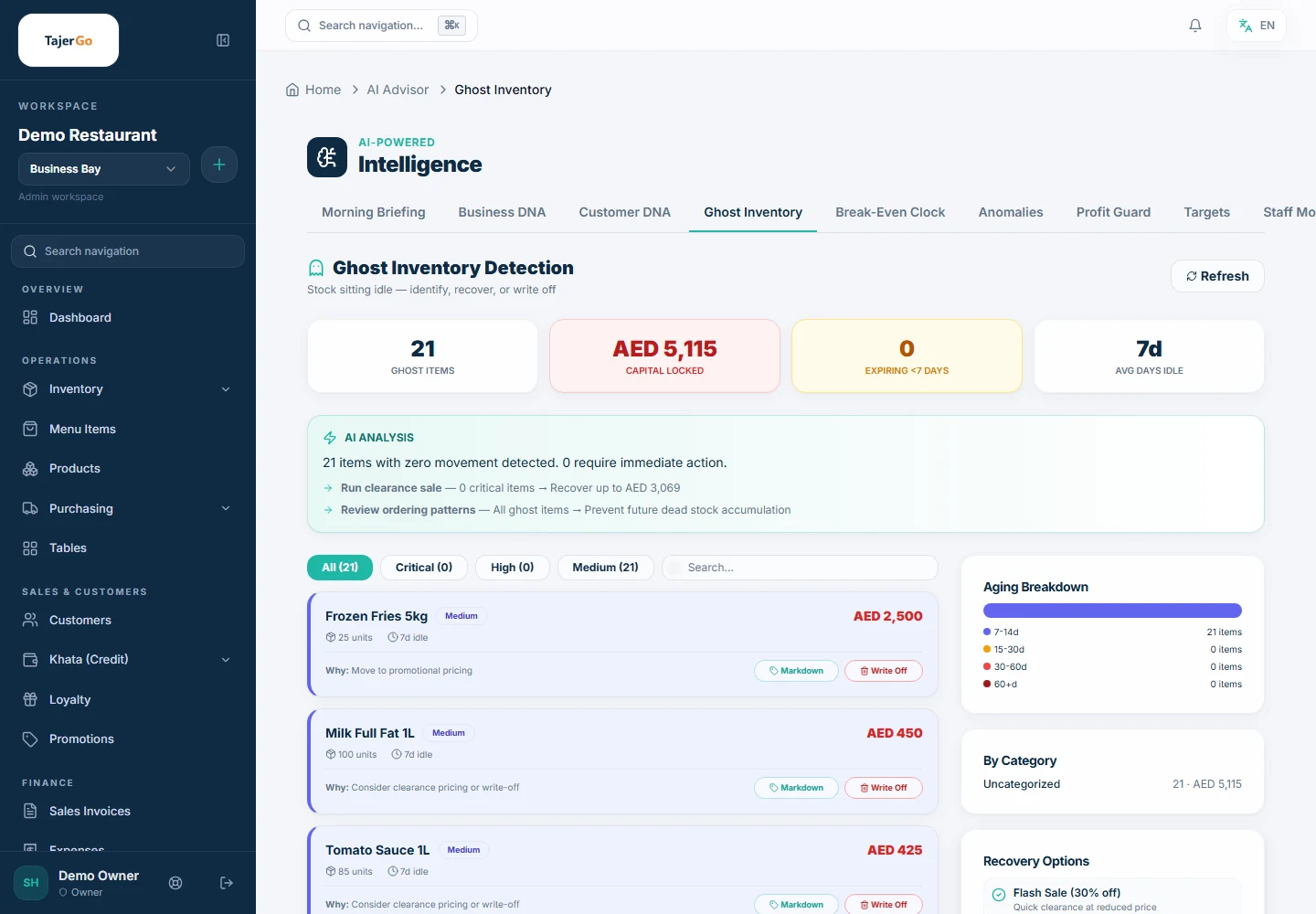
- Ghost Inventory DetectionAn AI analysis that reconciles units sold at the POS against recorded stock movements. When the two do not agree — more stock left the building than sales or logged wastage explain — the system surfaces a Ghost Inventory alert. This catches theft, unreported wastage, and systematic miscounts that a spreadsheet-based approach would never surface. Severity and estimated AED impact are shown.
- On-Terminal Inventory ViewCashiers and floor staff see live stock status (In Stock / Low / Sold Out) directly on the POS terminal without needing access to the admin portal. Managers can mark an item as 86'd (sold out) in one tap, removing it from the checkout menu immediately.
- Inventory Impact ReportingDedicated intelligence report showing burn rate per item, estimated days to stockout, and revenue at risk if a critical item runs out. Available both in the admin analytics hub and on the POS terminal Reports Center.
- Batch and Expiry TrackingTrack stock by batch number with assigned expiry dates. The system flags items approaching expiry so they can be prioritised in kitchen use or discounted — reducing food waste and supporting food-safety compliance.
- Stock ValuationReal-time monetary value of inventory on hand, calculated using the configured costing method (FIFO or Weighted Average). Gives owners and accountants an accurate picture of the asset value sitting on the shelves.
- Units of Measure (UOM)Buy in one unit (case, carton, litre), stock in another (kg, piece, portion), and sell in a third — with automatic conversion between units. Eliminates the manual maths that causes stock discrepancies at restaurants that purchase in bulk.
- AI-Suggested ReplenishmentBased on the demand forecast and the configured days-of-cover setting, TajerGo suggests reorder quantities per product. The system effectively writes the shopping list, calibrated to actual demand rather than the previous week's gut feel.
How inventory management works in TajerGo
Stock depletion from the POS in real time
When a cashier completes a sale at the TajerGo POS, the platform looks up the Recipe (Bill of Materials) attached to each menu item sold and deducts the corresponding ingredient quantities from the inventory in real time. A dish sold is not just a revenue event — it is simultaneously a stock movement event. No end-of-day batch job. No manual adjustment. The on-hand quantity is accurate the moment the receipt prints.
Costing method and valuation
| Costing method | How it works | Best for |
|---|---|---|
| FIFO (First In, First Out) | Oldest purchased units are costed first | Perishables, fresh produce |
| Weighted Average | Running average cost across all units received | Dry goods, bulk commodities |
The choice is made once at setup and applies consistently across all stock movements, giving an accurate cost-of-goods-sold figure per item.
Running a stock take
- Open Inventory > Stock Audit from the admin portal, or Stock Count from the POS terminal.
- Select the products or category to count.
- Enter the physically counted quantity for each item.
- Commit the count — the system calculates variance (system quantity minus counted quantity) and adjusts on-hand stock.
- The variance log is retained for audit purposes. A negative variance (less than expected) triggers investigation; a significant unexplained negative is a Ghost Inventory signal.
Ghost Inventory: from alert to action
Ghost Inventory fires when the AI reconciliation layer detects a gap between sales-implied stock consumption and recorded movements. The alert shows the affected products, the estimated unaccounted quantity, and an AED value. The operator then reviews the wastage log, the transfer log, and the stock count history to identify the source — whether that is unreported spoilage, a supplier short-delivery not caught at goods receipt, or stock leaving the premises without a transaction.
Who is this for?
- Independent UAE restaurants and cafes that currently manage stock on a whiteboard or spreadsheet and want to know, for the first time, what food cost is actually doing to their margins.
- Multi-branch F&B operations (2–50 locations) that need a consolidated stock picture across all outlets and want to balance inventory across branches rather than over-ordering at every site.
- Cloud kitchens managing multiple concepts from one prep kitchen, where accurate ingredient-level depletion by concept is critical to costing.
- Restaurant groups preparing for VAT or FTA audit that need a complete, timestamped stock movement history.
- Franchise operations where head office needs visibility of branch-level stock without relying on WhatsApp messages from branch managers.
Why it matters for UAE restaurants
Food cost is the largest variable cost in UAE F&B. With ingredient prices in AED subject to supplier price changes and import fluctuations, knowing your real on-hand stock versus your expected stock at any moment is the difference between a profitable month and one spent wondering where the margin went.
Ramadan and peak-season demand creates inventory pressure that manual systems cannot handle — high-velocity sales clear stock faster than expected, and Ghost Inventory problems compound when the back of house is busy. TajerGo's real-time depletion and low-stock alerts surface problems during the shift, not the next morning.
Food waste is both a cost and a regulatory and reputational issue in the UAE, where the Food & Agriculture Organisation has tracked high per-capita food waste rates. Wastage logging with reason codes, batch-expiry tracking, and AI replenishment calibrated to demand all reduce the AED lost to expired or over-ordered stock.
Multi-branch licensing in the UAE means operators often run branches in different emirates with different supply chains. Branch-level inventory with transfer tracking replaces the spreadsheet-per-branch model and gives a single consolidated view.
Frequently asked questions
What is restaurant inventory management?
Restaurant inventory management is the process of tracking every ingredient and product a restaurant holds — how much arrived, how much was used in dishes sold, how much was wasted, and how much remains. In TajerGo, this happens automatically: each sale at the POS deducts ingredients via the recipe, each goods-received note adds stock, and each wastage log removes it, giving a live, accurate on-hand figure at all times.
How do I do a stock take in TajerGo?
Open Inventory > Stock Audit (admin portal) or Stock Count (POS terminal), select the items or category to count, enter the physically counted quantities, and commit. TajerGo calculates the variance between the system quantity and your count, adjusts on-hand stock, and saves the variance record for audit. You can count in sections across a shift rather than closing for a full count all at once.
What is stock variance and why does it matter?
Stock variance is the difference between the quantity your inventory system expects you to have (based on receipts, sales, and adjustments) and the quantity you physically count. A negative variance — less stock than expected — means something left the building without being recorded. Common causes include unreported wastage, theft, short deliveries from suppliers, and recipe inaccuracies. TajerGo logs every variance at each count so you can track whether shrinkage is improving or worsening over time.
What is Ghost Inventory?
Ghost Inventory is stock that the system records as existing but has likely already left the premises — through theft, unreported waste, or systematic miscounts. TajerGo's Ghost Inventory detection runs an AI reconciliation between units sold at the POS and recorded stock movements. When the two do not match, the system surfaces an alert with the affected products and an estimated AED impact. It is the difference between knowing you have a problem and discovering it only at month-end when the numbers refuse to balance.
How do I manage inventory across multiple branches in TajerGo?
Each branch maintains its own stock position. In the admin portal, you can view stock levels per branch from a single dashboard. When one branch has surplus and another is running low, use Stock Transfers to move stock between them — the transfer is tracked, both branch positions update, and there is a full transfer record for audit. Low-stock alerts and the WhatsApp Daily Digest can be configured to surface alerts for specific branches, so a head-office owner sees cross-branch stock health without logging into each branch separately.
Does TajerGo support FIFO costing for perishable ingredients?
Yes. TajerGo supports both FIFO (First In, First Out) and Weighted Average costing methods. FIFO is recommended for perishables because it ensures the cost of goods sold reflects the oldest — and typically cheapest — stock first, which is also the stock most likely to have been used first. The costing method is set once at the account level and applied consistently across all stock movements and inventory valuations.
Can cashiers see stock levels on the POS terminal?
Yes. The POS terminal includes a live stock view where cashiers can see on-hand quantities and status (In Stock, Low, Sold Out) for every product. Managers can mark an item as sold out in one tap, which removes it from the checkout menu instantly — so cashiers never promise a dish that cannot be delivered.
---
---
Want the deep-dive guide? Read the related TajerGo guide for the full walkthrough.
Explore more TajerGo features
Every feature, one flat price
TajerGo is AED 499 per branch with every feature included — no upgrade gatekeeping.
Book a demoSee pricing