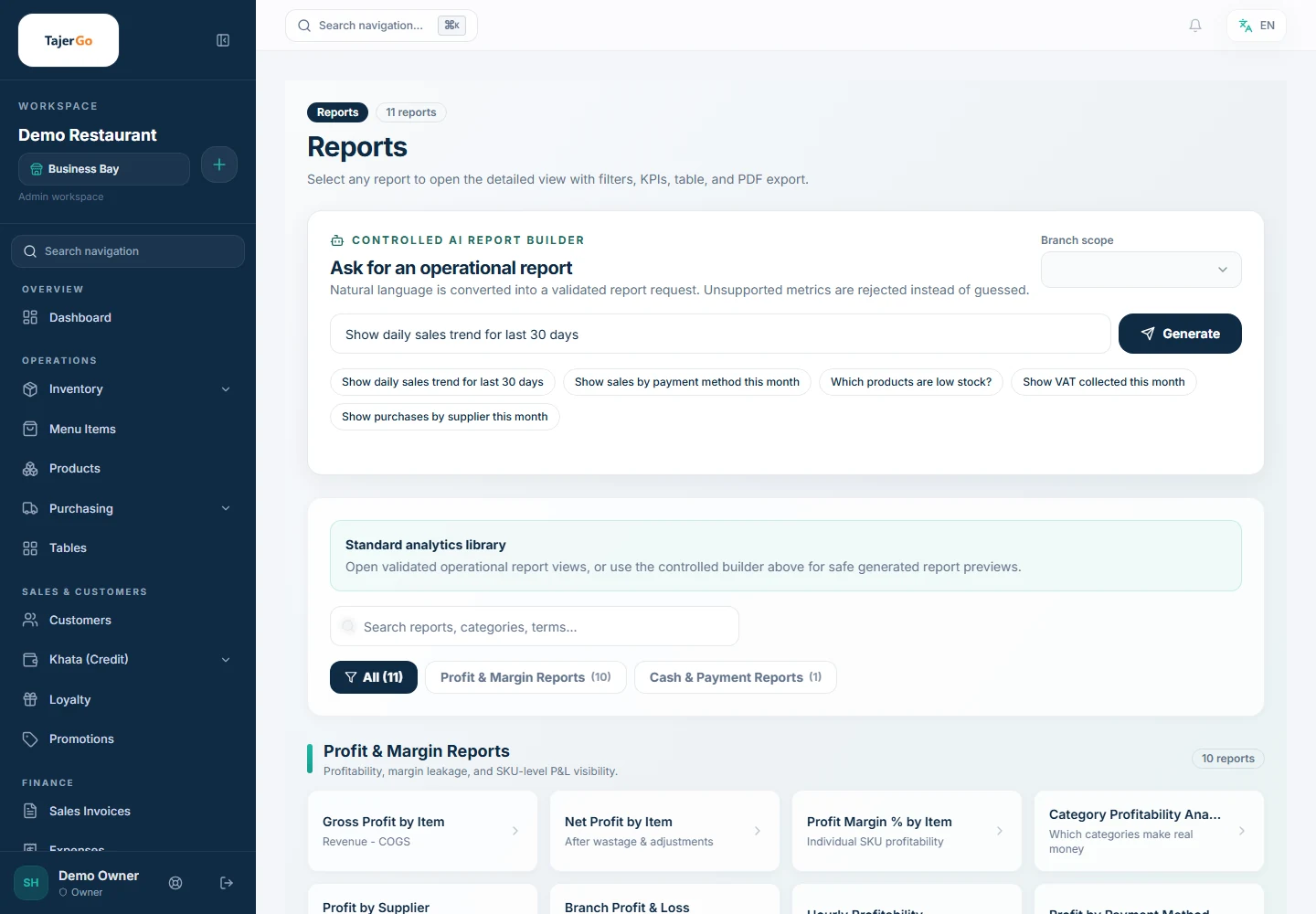
Data is only useful when it arrives at the right time and in a form the owner can act on. TajerGo, the UAE-built restaurant operating system that combines POS, inventory, purchasing, Khata, AI insights, and VAT compliance in one platform, delivers a reporting suite that spans the till and the back office: standard operational reports available to cashiers and managers without a back-office login, an AI-powered intelligence layer that scores shifts and flags anomalies, and a back-office analytics hub with 100+ ready-made report templates across 12 categories. Every report is filterable by date range and branch, printable on thermal or office paper, and exportable to PDF or Excel in a single click.
What Reports & Analytics features does TajerGo include?
On-terminal reports (available directly at the POS without a back-office login):
- Sales SummaryTotal and net sales, order count, average ticket, discounts, and VAT broken down by order type and payment method, giving an end-of-day snapshot of what the branch earned and how customers paid.
- Hourly SalesRevenue and order count broken down by hour of the day, revealing peak trading periods and slow hours so staffing and prep levels can be matched to demand.
- Items PerformanceTop 10 and bottom 10 items by revenue with cost, profit, and margin per item, showing which menu items drive earnings and which drag on margin.
- Category PerformanceRevenue and units sold by menu category with each category's share of total sales, helping owners identify which cuisine sections perform and which underperform.
- PaymentsEach payment method's transaction count, gross collected, refunds, net collected, and percentage share of total, giving a precise picture of how money flows into the branch.
- RefundsEvery refund recorded in the period with reason, amount, and the staff member who processed it, providing a full audit trail for disputed transactions.
- Shift ClosureFull shift handover document showing expected cash versus actual cash, variance, payment breakdowns, cash movements, discounts, VAT, and signature lines — the standard handover record for cashier accountability.
- Cash MovementsEvery cash-in, cash-out, safe drop, and no-sale event logged during the shift with the approver and reason, so every AED movement is traceable.
- Cash VarianceOver and short figures by shift and by cashier, making patterns of cash discrepancy visible before they accumulate into significant losses.
- Staff ActivityPer-staff breakdown of orders handled, sales value, average ticket, discounts applied, voids, and refunds, giving managers an objective performance view per cashier.
- Staff EfficiencyTransaction speed, throughput, items per transaction, and top-performer ranking, measuring operational productivity at the till.
- Exceptions LogEvery void, price override, and discount override with the reason given and the staff member responsible, forming the audit trail for till exceptions.
- Live PerformanceReal-time (60-second refresh) view of current sales, orders in the current hour, and progress against daily target, so managers can intervene mid-shift rather than discovering shortfalls at close.
- ProfitabilityItem-level revenue, cost of goods sold, gross profit, and margin, linking sales data to ingredient cost so the true profitability of each menu item is visible.
- Shift RiskAI-generated risk scoring for the shift covering cash variance, discount patterns, void frequency, and override behaviour, with a verdict of Clean, Review, or Investigate and an AED impact estimate.
- Inventory ImpactStock burn rate, days-to-stockout, and critical/low/ok status per item, connecting sales activity to projected stock depletion.
- Customer InsightsRepeat customer versus walk-in ratio, high-value regular identification, and visit frequency data, helping staff understand who the branch's most valuable customers are.
- Order FlowAverage cycle time, prep time, cancellation rate, and bottleneck analysis by station or order type, surfacing operational inefficiencies in the kitchen and service process.
- AnomaliesAI-flagged unusual patterns across sales, cash, refunds, and voids with severity classification and the evidence behind each flag, so unexpected activity is caught the same day it happens.
PDF packs (multi-report bundles for handover, daily review, and loss prevention):
- Shift Closure Pack — Combines the shift closure report, payments breakdown, and cash movements into a single printable document for shift handover.
- Daily Operations Pack — Combines sales summary, order count, average ticket, refunds, discounts, tax, and trend data into a single daily review document.
- Leakage Control Pack — Combines voids and overrides exposure, risk level, and the most-frequent staff members per exception type into a single document for loss-prevention review.
Back-office analytics hub (accessible from the admin portal):
- Analytics Hub with 100+ templates — A library of ready-made reports across 12 categories: Sales, Products, Customers, Staff, Inventory, Payments, Tax, Profit, Khata, Promotions, Branches, and more, filterable by date range and branch.
- Sales Forecast report — Where sales are heading by product and branch, based on AI demand prediction.
- Profit Suite — Gross and net margin by item, category, and branch, giving a comprehensive view of where the business makes and loses money.
- Khata Aging report — Outstanding credit broken down by age bucket showing how old and how risky the credit book is.
- Tax / VAT Ledger — FTA-ready VAT collected and input per period, giving the data needed for VAT returns without manual compilation.
- Payment Reconciliation report — Cash, card, and wallet totals matched to expected figures, catching discrepancies before they become accounting problems.
- Staff & Shift report — Performance and cash accountability per shift, combining the on-terminal shift data with back-office visibility.
- Inventory Movement report — What stock moved, what is sitting still, and what is shrinking, connecting purchasing and sales data.
- AI Report Builder (natural language) — Type a question in plain English or Arabic, such as "show me last month's top products by profit in the Dubai branch," and the system builds the report from permitted metrics; the result is saveable and exportable.
- Excel and PDF export — Any report in the analytics hub or the on-terminal reports center can be exported to Excel or PDF in one click, producing clean documents suitable for accountants, auditors, or bank submissions.
How Reports & Analytics works in TajerGo
On-terminal reports need no back-office login
All 20+ on-terminal reports are accessible directly from the POS under the Reports section. A cashier or manager can pull a shift closure, a payments breakdown, or a staff efficiency view without switching devices or opening the admin portal. Quick date-range presets (today, yesterday, last 7 days, last 30 days, current month, and a custom range) mean most reports are three taps away. Every report displays KPI summary cards with trend arrows, sortable tables with totals, and a branded header carrying the business name, branch, terminal identifier, and timestamp.
PDF packs compress multi-report handovers into one document
Rather than printing individual reports separately, the three PDF packs — Shift Closure, Daily Operations, and Leakage Control — bundle the relevant reports into a single exportable document. Shift Closure Pack is designed to accompany a cashier's end-of-shift handover; Daily Operations Pack covers the manager's morning review; Leakage Control Pack is built for owners who want a regular view of exception and loss patterns.
AI intelligence reports run automatically
The five AI-powered intelligence reports — Live Performance, Profitability, Shift Risk, Inventory Impact, and Anomalies — do not require the owner to build or configure anything. Shift Risk runs at every shift close and delivers a Clean, Review, or Investigate verdict with the evidence behind it. Anomalies refreshes automatically and surfaces unusual patterns with severity and recommended action. Profitability links every sale to the ingredient cost recorded in recipes, giving a gross-margin figure per item rather than a revenue figure alone.
The back-office analytics hub and AI report builder cover the long tail
When a standard template does not answer the specific question — for example, "which modifier is attached to the most refunds?" — the AI Report Builder accepts a plain-language question, identifies the relevant metrics, and builds and displays the report. Results can be saved as a named report for future use and exported to Excel or PDF.
Who is this for?
Restaurant owners who want a morning data review without opening a spreadsheet — the Daily Operations Pack and the back-office dashboard give them that in under five minutes.
Shift managers who need an accountable shift close with documented cash variance — the Shift Closure report and Shift Closure Pack cover the full handover.
Accountants and bookkeepers serving UAE restaurants who need clean, exportable VAT ledger data and payment reconciliation without chasing the owner for raw figures.
Multi-branch operators who need to compare branch performance from one dashboard — the back-office analytics hub allows branch-level filtering across every report category.
Loss-prevention-conscious owners who want to track exceptions, discount abuse, and cash variance before they become material — the Exceptions Log, Cash Variance report, Shift Risk report, and Leakage Control Pack address this directly.
Why it matters for UAE restaurants
UAE restaurants operate under FTA VAT requirements, which means VAT collection and reporting must be accurate and auditable. The Tax/VAT Ledger report produces FTA-ready data per period without manual compilation. Shift closure records and cash variance reports support the internal controls that auditors and bank lenders expect to see. For restaurants on the path to a bank facility or investment, clean, time-stamped PDF reports covering sales, payments, and profitability are often the first documents requested. TajerGo produces those documents directly from the POS, so the owner does not need to reconstruct data from a cash register tape or a spreadsheet after the fact.
The UAE restaurant market also operates with significant cash transactions alongside card and wallet payments. The Cash Movements report, Cash Variance report, and the Shift Closure Pack give managers a documented, denomination-level record of every AED that enters and leaves the drawer, which matters both for internal accountability and for demonstrating cash-handling controls to auditors.
Frequently asked questions
What reports does TajerGo include on the POS terminal itself?
TajerGo includes 20+ reports directly on the terminal organized into four categories: Standard (Sales Summary, Hourly Sales, Items Performance, Category Performance, Payments, Refunds), Shifts and Cash (Shift Closure, Cash Movements, Cash Variance), Staff Activity (Staff Activity, Staff Efficiency, Exceptions Log), and Intelligence (Live Performance, Profitability, Shift Risk, Inventory Impact, Customer Insights, Order Flow, Anomalies), plus three PDF packs bundling multiple reports for handover and loss-prevention review.
How do I read my restaurant sales data without an accountant?
Open the Sales Summary report for a revenue and order-count view, then move to Items Performance to see which menu items are profitable and which are not. The Hourly Sales report shows when business peaks so you can staff and prep to match demand. If a figure looks unusual, the Anomalies report flags the same patterns automatically with a plain-language explanation of what was detected.
What is a profitability report and how does TajerGo calculate it?
The Profitability report links each menu item's sales revenue to its cost of goods, calculated from the recipe (bill of materials) defined in the catalog. For every item sold, TajerGo applies the ingredient quantities and the cost entered for each ingredient to produce a gross profit and margin figure per item. This requires recipes to be configured in the catalog; items without a recipe show revenue only.
How do I track cash variance in TajerGo?
At shift close, the cashier enters a physical cash count broken down by AED denomination. TajerGo computes expected cash from recorded cash sales and cash movements, then compares it to the counted figure. The difference is classified as Zero, Acceptable, or Critical. Critical variance requires a reason and escalates to manager approval. The Cash Variance report shows over and short figures by shift and by cashier across any date range, making patterns visible over time.
Can I export TajerGo reports to PDF?
Yes. Every on-terminal report and every back-office analytics report has a one-click PDF export. The PDF includes a branded header with business name, branch, terminal, and timestamp, KPI summary cards, formatted tables with totals, and for shift reports, signature footer lines. The three PDF packs — Shift Closure, Daily Operations, and Leakage Control — bundle multiple reports into a single document. Reports can also be exported to Excel from the back-office analytics hub.
Does TajerGo support VAT reporting for UAE FTA compliance?
Yes. The Tax/VAT Ledger report in the back-office analytics hub records VAT collected and input by period in FTA-ready format. Every receipt and tax invoice carries the TRN, VAT breakdown, and a QR code as required by UAE FTA guidelines. The data can be exported to Excel or PDF for submission to an accountant or for direct use in a VAT return.
What is the Shift Risk report?
Shift Risk is an AI-powered report that runs at every shift close and evaluates the shift for patterns associated with cash handling problems, discount abuse, void frequency, and manager override activity. It produces a verdict of Clean, Review, or Investigate with a list of the factors that drove the score and an estimated AED impact. Critical findings trigger a manager approval workflow inside the app.
---
---
Want the deep-dive guide? Read the related TajerGo guide for the full walkthrough.
Explore more TajerGo features
Every feature, one flat price
TajerGo is AED 499 per branch with every feature included — no upgrade gatekeeping.
Book a demoSee pricing