
Delivery KOT
Delivery tickets that leave the pass packed right
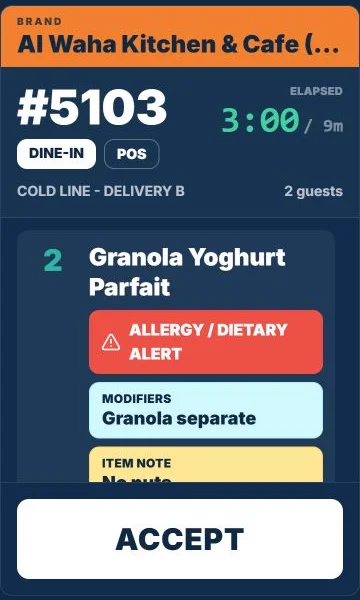
In a delivery kitchen the ticket is the packing list. Each one shows the brand, the delivery or pickup slot, allergy alerts in red and notes such as seal both cups, with a timer against its target. Accept a new ticket, finish it when the bag is sealed.
Step by step
How it works
Accept the ticket
New delivery tickets wait for a cook to accept them, so none is started twice.
Kitchen display, Cloud kitchens Cook against the timer
The elapsed time sits next to its target for every parcel.
Kitchen display, Cloud kitchens Check the packing notes
Raita separate, no sugar, cut in four: the notes that decide the rating.
Kitchen display, Cloud kitchens Finish when sealed
Finishing clears the ticket for the next rider.
Kitchen display, Cloud kitchens
What you can do
Accept and finishStarter plan
Clear ownership of each parcel.
Allergy alerts
Dietary alerts highlighted on the ticket.
Pickup and delivery slots
The slot label travels with the ticket.
Station lines
Hot line and cold line see their own items.
The connected loop
Connected to
Pricing
Plans and pricing
Frequently asked questions
Can riders see order status?
Not from TajerGo today. The kitchen screen is for the line and the pass.
How do aggregator orders reach the screen?
They are keyed at the counter and join the same queue. Swiggy and Zomato orders are keyed in at the counter today. Delivery-platform integrations are coming soon, not live today.
Stop sending half-packed parcels
Book a demo or start on the free plan.
Ask our team to call you
Leave your details and the TajerGo team will get back to you.