
Restaurants & cafés: POS AI
POS AI suggestions the cashier approves
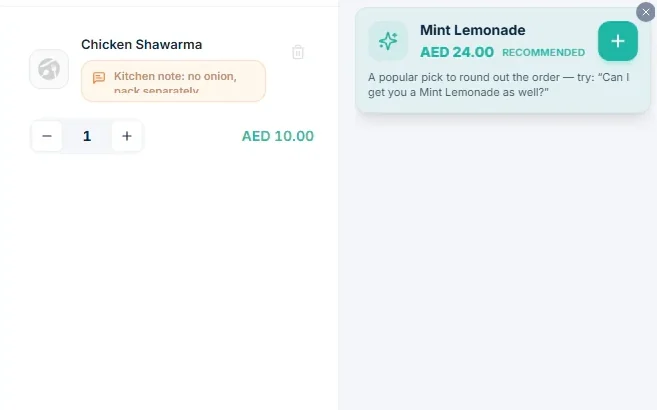
TajerGo POS AI shows a suggestion beside the cart, such as a drink that suits the dish being ordered, based on the basket and what is in stock. Pricing suggestions reach the till for a person to approve. The cashier adds or dismisses each one, nothing enters the basket on its own, and changes to stock or money keep their approval step.
Step by step
How it works
See the suggestion
One add-on appears beside the cart, drawn from the basket and items in stock, with a line the cashier can use.
A suggestion card beside the cart that the cashier adds or dismisses Add or dismiss
One tap adds it; one tap dismisses it. The guest decides, the cashier records.
Demonstration data Approve price suggestions
Pricing suggestions wait for a person with the right permission.
An approval queue where price changes wait until a manager approves them
What you can do
Basket-aware add-ons
Suggestions based on the basket and items in stock.
Cashier in control
Every suggestion can be dismissed; nothing is added on its own.
Pricing suggestions approved at the till
A price change is suggested, and a person approves it.
Branch scope
The till view covers the signed-in branch.
Optional
The till, payments and kitchen display work without POS AI.
The connected loop
Connected to
Pricing
Plans and pricing
Frequently asked questions
Does POS AI add items to the order by itself?
No. The suggestion appears for the cashier, who adds it or dismisses it.
Do suggestions use guest history?
Most use the basket, stock and menu. Guest history is used where the role and branch allow it.
Will suggestions guarantee higher sales?
No. The suggestion is a prompt; the guest, the menu and the service decide the result.
Is POS AI required?
No. The core till works without it.
Try a suggestion at the demo till
Book a demo or start on the free plan.
Ask our team to call you
Leave your details and the TajerGo team will get back to you.