On this page
- Find the Bottleneck Before Changing the POS
- Build Combos Around Clear Choices
- Test Combo Pricing With a Real Basket
- Measure Accurate Order Entry, Including Corrections
- Send the Kitchen the Information It Needs
- Manage Three Queues Separately
- Coordinate Counter, Takeaway and Delivery Orders
- Check Combo Costs Alongside Sales
- Use Service Metrics Carefully
- Prepare for Connection Problems
- Run a Rush-Hour Trial Before Buying
- Choose a System Your Whole Service Team Can Test
- In the product
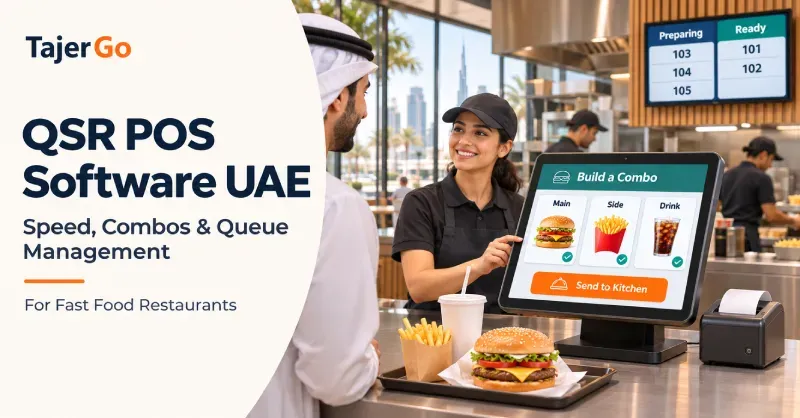
A customer orders two burger meals, changes one drink, adds cheese and asks for one meal to be packed separately. Behind them, the queue keeps growing. For owners comparing QSR POS software UAE, this is the transaction worth testing. A simple order entered on an empty till tells you far less about how a system handles peak service.
Quick-service restaurants need accurate ordering, clear kitchen instructions and dependable payment handling. Combos add another requirement: every included item, required choice and paid upgrade must stay connected.
The right setup helps the cashier complete the order without overlooking a choice, gives the kitchen an understandable ticket and lets the pickup team identify what is ready. Speed comes from that whole process working together.
Find the Bottleneck Before Changing the POS
| Where customers wait | What to investigate |
|---|---|
| Before ordering | Menu clarity, cashier availability and order-entry steps |
| During payment | Terminal connection, payment confirmation and manual entry |
| After payment | Kitchen workload, missing instructions and item availability |
| At pickup | Order identification, packing checks and completion status |
A long queue does not always start at the till.
Customers may be waiting to order, waiting for payment, waiting for preparation or standing at pickup because nobody knows which meal is complete. Each problem needs a different response.
Observe a busy service before writing your software requirements. Record where delays occur and which questions staff repeatedly ask each other.
If cashiers enter orders quickly but the grill cannot keep up, a faster checkout screen may simply send work into the same bottleneck sooner.
Build Combos Around Clear Choices
A combo should represent a complete meal with defined rules.
For a burger meal, those rules might include one burger, one side and one drink. Customers may then choose a larger side, a premium drink or an extra ingredient.
A suitable fast food POS system should make those choices easy to enter and difficult to misunderstand.
Separate included choices from paid upgrades
The cashier needs to know which options are included and which change the price.
For example:
- Regular fries are included.
- Large fries add a configured amount.
- A standard soft drink is included.
- A selected premium drink carries an upgrade charge.
- Extra cheese is an optional addition.
Staff should not need to remember every surcharge or manually edit prices during service.
Make required choices explicit
If every meal needs a drink selection, the system should prompt for it before the meal is completed.
A default can be useful where it matches the business’s rules, but it should remain visible. Silently adding a drink the customer never selected can create waste and corrections.
Keep each meal identifiable
Two identical combos can have different instructions.
One may include a spicy burger and a large drink. The other may need no onions and a regular drink. Check whether the cart and kitchen ticket preserve those relationships.
A combined list of loose modifiers can leave staff guessing which instruction belongs to which meal.
Test Combo Pricing With a Real Basket
Use a sample basket that includes several decisions, not just one standard meal.
Consider this hypothetical order. Prices are illustrative customer-facing amounts:
| Selection | Price |
|---|---|
| Burger meal | AED 28 |
| Large fries upgrade | AED 3 |
| Extra cheese | AED 2 |
| Second burger meal | AED 28 |
| Total | AED 61 |
During the demonstration, change the first meal back to regular fries. The total should reduce to AED 58, while the extra cheese remains attached to the correct burger.
Then remove the second combo. Check that its included side and drink disappear with it.
Test the exceptions
Ask the provider to demonstrate:
- Replacing an included item.
- Removing an upgrade.
- Changing one of two similar meals.
- Applying an authorised promotion.
- Refunding one component or meal.
- Making a correction after kitchen submission.
Confirm how the software represents the combo internally. Some systems use bundles; others use products and modifier groups. What matters is whether the resulting price, ticket, stock movement and report match your rules.
TajerGo’s QSR POS workflow includes required choices, priced add-ons and held orders. Bring your actual meal structure to the demonstration to confirm the full configuration.
Measure Accurate Order Entry, Including Corrections
A fast selling screen should help staff find common products and complete the required selections without searching through unnecessary options.
Keep popular meals easy to reach. Group choices in an order that follows the conversation with the customer.
For example, a cashier might select the meal, burger variation, side, drink and optional extras. If those steps appear inconsistently across products, training becomes harder.
Give undecided customers a practical option
An order-hold function can let staff pause an incomplete basket while a customer decides.
Test how the cashier retrieves it and distinguishes it from other held orders. Confirm when a held order reaches the kitchen so that food is not prepared before the customer confirms.
Include new staff in testing
An experienced manager may navigate almost any screen quickly. A newer cashier reveals whether labels and choices are understandable.
Have both enter the same basket. Note where they hesitate, make mistakes or ask for help.
Send the Kitchen the Information It Needs
The kitchen needs an accurate preparation ticket, not a copy of every payment detail.
Items, quantities, modifiers and relevant notes should be clearly connected. Order type and packaging instructions should also be visible where they affect preparation.
Route work to the appropriate station
A meal may involve the grill, fryer and drinks counter. Check how each station receives its part of the order.
The team also needs a way to recognise that those parts belong to the same customer order. Completing fries does not necessarily mean the whole meal is ready.
TajerGo’s kitchen display system supports station routing, item notes and elapsed ticket time, with staff accepting and finishing tickets on screen.
Make amendments distinguishable
After a ticket reaches the kitchen, change one burger to “no onion.”
Watch what appears. Staff should be able to identify the change without treating it as another burger order.
Agree on how changes are handled once preparation has started. The software’s status and the kitchen’s physical progress need to be considered together.
Treat dietary instructions as a service responsibility
A visible alert can help communicate an instruction. Staff still need to follow the restaurant’s ingredient-checking and preparation procedures.
Do not assume that selecting a note establishes that the finished meal meets the customer’s requirement.
Manage Three Queues Separately
Quick-service operations often have three queues: ordering, preparation and collection.
A system can support visibility across them, but each queue needs clear ownership.
The ordering queue
The cashier should be able to enter a complete order and confirm the payment result without unnecessary repetition.
Menu boards and staff guidance also matter. If customers only discover important choices at checkout, the till becomes the place where every decision is made.
The preparation queue
Kitchen staff need to see waiting work and identify delayed tickets.
Elapsed time is useful, but managers should understand when the timer starts. Time since confirmation and time since preparation began measure different things.
The collection queue
Use a consistent order identifier, such as a number.
At pickup, staff should verify the meal, extras, drink and packaging request before handing it over.
A staff-facing kitchen screen is different from a customer-facing collection display. If you need public order numbers, collection announcements or self-service kiosks, verify those capabilities separately.
Coordinate Counter, Takeaway and Delivery Orders
A QSR may serve walk-in customers while preparing delivery orders from another channel.
Ask how the system identifies each source and whether staff can see all accepted work without duplicating tickets.
Confirm the exact integration
Receiving delivery orders, synchronising a menu and updating item availability are separate functions.
For every essential platform, verify the live UAE connection, supported actions, charges and error procedure.
Do not treat a planned integration or a platform logo as proof that the restaurant’s complete workflow is supported.
Establish a workable priority policy
The kitchen needs an agreed approach when counter orders and delivery collections compete for capacity.
Use ticket age, preparation requirements and operational judgment. Moving every newly arrived rider’s order to the front can make other customers’ waits unpredictable.
Check Combo Costs Alongside Sales
Combos can increase basket value while reducing the contribution per item.
Before promoting a meal, calculate the ingredients and packaging it includes. Review upgrades separately.
For a hypothetical combo:
- Net selling price: AED 30
- Ingredients and packaging: AED 11
- Contribution before other expenses: AED 19
If an upgrade adds AED 3 in net revenue and AED 1.20 in cost, it adds AED 1.80 in contribution on that basis.
That calculation excludes labour, rent and other operating expenses. Delivery deductions may also need a separate scenario.
Follow substitutions into stock
Replacing a drink or changing a portion can affect stock as well as price.
Ask whether the configured choice deducts the selected product and excludes the replaced component. A correct bill does not independently establish a correct inventory movement.
TajerGo’s recipe-costing and production workflow provides the relevant ingredient and unit-mapping context to test.
Use Service Metrics Carefully
A useful QSR review connects speed with accuracy.
Start with:
- Order entry speed (seconds per ticket)
- Preparation time (order to kitchen complete)
- Pickup speed (ready to customer handoff)
- Accuracy rate (orders without remake or refund)
Only calculate measures supported by reliable timestamps or observations.
An average can hide the longest waits. Where the data allows, review how many orders exceed your own service target.
Compare similar order types. A drink-only sale and a large family meal should not be judged against an identical preparation expectation.
Prepare for Connection Problems
A QSR needs a tested response when internet access drops.
Check whether a prepared till can save the intended orders, which payment methods remain available and whether the kitchen still receives tickets.
TajerGo’s offline POS and sync guide describes supported cash and wallet transactions queuing locally and uploading after reconnection. Support depends on the device and payment method.
Card authorisation and kitchen connectivity need separate confirmation.
After reconnection, verify pending orders before re-entering transactions. Staff also need to recognise any delayed kitchen tickets for food already prepared through a fallback process.
Run a Rush-Hour Trial Before Buying
Prepare a short test with several orders entered close together:
- A standard combo.
- A combo with upgrades.
- Two meals with different modifiers.
- A held order.
- A kitchen amendment.
- A split payment.
- An unavailable item.
- An offline transaction and recovery.
Let the cashier, kitchen and pickup team participate.
Observe whether they can explain each order’s status. Check the final bill, ticket, stock effect and transaction record.
The result should be a clear list of demonstrated functions and unresolved requirements.
Choose a System Your Whole Service Team Can Test
Bring your busiest combo, a common correction and a realistic queue scenario to a TajerGo demonstration.
Follow each order from the cashier to preparation and pickup. Then inspect the recorded price, payment and ingredient usage.
A suitable QSR system should help the team complete that sequence accurately, with clear responsibilities when an order changes or service falls behind.
Read next: Best Restaurant POS Software UAE · Restaurant Reporting and Analytics Software UAE
About this guide. Maintained by the TajerGo Editorial Team. Last updated 6 Nov 2026. Worked examples use illustrative numbers, not customer results.