On this page
- What Is Supplier Invoice Scanning Software?
- OCR, AI Extraction and Item Matching Are Different Tasks
- How a Restaurant Invoice Moves From Upload to Approval
- Why Pack Sizes Need Careful Review
- A Worked Invoice-Review Example in AED
- Connect Invoice Review With Purchasing Control
- How Approved Invoice Costs Can Affect Recipe Costing
- Common Errors in AI Invoice Scanning
- What UAE Restaurants Should Check Before Buying
- Measure the Benefit Using Real Work
- Test One Invoice From Image to Approved Record
- In the product
- Frequently Asked Questions
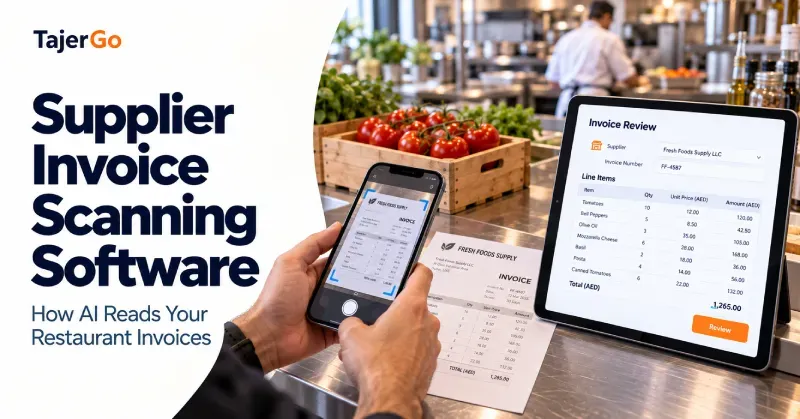
A restaurant supplier invoice contains more than a payment total. It records ingredients, quantities, pack sizes, prices and charges that can affect purchasing records and food costs. Supplier invoice scanning software turns those details into structured fields, helping staff review a purchase without typing every line from the original document.
The difficult part is interpreting what each line means. A supplier’s “tomato fresh box” needs to match the correct inventory item. A carton price needs the right pack conversion. An invoice for a delivery already received must not increase stock again.
This guide explains how AI-assisted invoice processing works, where mistakes can occur and what restaurant teams should test before choosing a system.
What Is Supplier Invoice Scanning Software?
Supplier invoice scanning software reads an uploaded invoice and prepares its contents for use in a purchasing or accounting workflow.
Depending on the system, it may accept photographs, scanned documents or PDFs and extract fields such as:
- Supplier name.
- Invoice number and date.
- Product descriptions.
- Quantities and units.
- Unit prices.
- Discounts and line totals.
- Tax amounts and invoice totals.
Restaurant-focused systems may also suggest matches between supplier descriptions and existing stock items.
The result should be treated as a prepared record awaiting verification. Reading an invoice does not establish that the goods arrived, that the supplier charged the agreed price or that every extracted field is correct.
OCR, AI Extraction and Item Matching Are Different Tasks
The phrase “AI invoice scanning” can cover several functions. Understanding the difference helps restaurant owners ask better questions during a demonstration.
OCR reads visible text
Optical character recognition, or OCR, converts text in an image into machine-readable characters.
For example, it may read:
Fresh Cream 1L | Qty 12 | Rate 18.00 | Amount 216.00
Poor image quality, small print or marks across the document can cause recognition errors.
Extraction organises the information
An extraction system identifies which values belong to which fields.
It needs to distinguish the invoice date from the delivery date, the unit price from the line total and the subtotal from the final amount.
A document can contain readable text while still being interpreted incorrectly.
Item matching connects the invoice with restaurant records
The supplier’s description may differ from the restaurant’s standard item name.
“Cooking Cream 1 Ltr” might correspond to an inventory record called “Cream, cooking.” Matching needs to consider the product, size and unit, rather than relying on a similar name alone.
These stages may use different technologies. Ask the vendor to explain the actual workflow instead of assuming that an AI label guarantees accurate results.
How a Restaurant Invoice Moves From Upload to Approval
A dependable process keeps the original document available throughout the review.
1. Capture the complete invoice
Photograph or upload all relevant pages. Make sure the document is legible and that edges, totals and invoice references are included.
For photographs:
- Place the invoice flat.
- Use even lighting.
- Avoid glare and heavy shadows.
- Keep the camera steady.
- Check that small text is readable.
- Include continuation pages.
A cropped total or missing second page can leave the extracted record incomplete.
2. Review the supplier and document details
Check that the invoice belongs to the correct supplier, business and branch.
Confirm the invoice number, date and document type. A delivery note, quotation or credit note should not silently become a normal supplier invoice.
3. Check each prepared line
Compare the extracted product, quantity, unit and price with the source document.
Pay particular attention to decimal points, abbreviations and pack quantities. “1.5” read as “15” can create a substantial stock or cost error.
4. Confirm inventory matches
Review the suggested item against the restaurant’s product records.
If a line cannot be matched confidently, leave it for correction. Creating a new stock item for every unfamiliar supplier description can fill the inventory list with duplicates.
5. Compare the invoice with the order and receipt
Check what was ordered and what staff accepted.
An accurately scanned invoice can still contain a billing discrepancy. Extraction accuracy and purchase accuracy are separate questions.
6. Approve and post the reviewed record
An authorised person should confirm the record before it affects the relevant purchasing, stock or cost information.
TajerGo’s supplier invoice review workflow supports stock updates by checking prepared lines, product matches and existing receiving records.
Why Pack Sizes Need Careful Review
Restaurant invoices often use purchase units that differ from inventory and recipe units.
A supplier may sell milk by the carton, flour by the bag and cooking oil by the container. The kitchen uses those products in litres, kilograms, grams or millilitres.
Consider this illustrative invoice line:
Cooking oil, 5-litre container: quantity 4 at AED 60 each
The correct interpretation is:
| Field | Value |
|---|---|
| Containers purchased | 4 |
| Quantity per container | 5 litres |
| Total purchased volume | 20 litres |
| Price per container | AED 60 |
| Total line value | AED 240 |
| Cost per litre | AED 12 |
If the software treats the quantity as four litres, it could understate the stock received and overstate the unit cost.
The invoice total might still look correct, so checking totals alone would not catch the problem.
Confirm conversions when suppliers change packaging
An established product match does not prove that the pack size remains unchanged.
If a supplier replaces a six-litre case with a five-litre case, the conversion must be reviewed. Otherwise, the restaurant may carry forward an incorrect quantity and cost per usable unit.
A Worked Invoice-Review Example in AED
Suppose a restaurant receives the following hypothetical invoice. Figures exclude tax to keep the example focused on quantities and prices.
AI extraction could prepare all three lines correctly. Staff then compare them with the order and delivery.
| Invoice line | Billed quantity | Unit price | Billed value |
|---|---|---|---|
| Chicken breast | 20 kg | AED 30/kg | AED 600 |
| Cooking oil | Four 5-litre containers | AED 60/container | AED 240 |
| Flour | Two 25 kg bags | AED 100/bag | AED 200 |
| Total | AED 1,040 |
The checks reveal:
- Only 18 kg of chicken was accepted.
- The approved chicken price was AED 28 per kilogram.
- The oil and flour quantities match the receiving record.
- Receiving has already added the accepted delivery to stock.
At the original agreed price, the accepted chicken quantity has a value of:
18 × AED 28 = AED 504
The billed chicken line is AED 96 higher. That difference needs resolution, taking account of any subsequently agreed price change or pending delivery.
The invoice-processing step must also recognise that stock was already received. Posting the bill should not add another 18 kg of chicken, 20 litres of oil and 50 kg of flour.
Scanning saves transcription work. The order and receipt checks establish whether the prepared bill is ready for approval.
Connect Invoice Review With Purchasing Control
A standalone scanning tool may export invoice fields. A connected restaurant workflow should also help staff review the transaction those fields describe.
Three-way matching compares:
- The purchase order.
- The goods received note.
- The supplier invoice.
This can reveal different products, short quantities or changed prices.
TajerGo’s purchasing and supplier controls connect these records and provide a supplier-bill review queue.
Keep partial deliveries visible
If a supplier invoices the full order but delivers part of it, the outstanding quantity needs a clear status.
Staff should establish whether the remaining goods are due later, the invoice requires correction or another agreed arrangement applies.
Handle credits separately
Returned products and supplier credits need a defined workflow. Uploading a credit document as an ordinary invoice could reverse the intended effect.
Ask the vendor to demonstrate supported credit-note and correction procedures.
How Approved Invoice Costs Can Affect Recipe Costing
Once an invoice is verified, its costs can contribute to the restaurant’s ingredient-cost records, depending on the configured costing method.
Those records can then support recipe calculations.
Suppose an ingredient’s applicable cost increases from AED 20 to AED 24 per kilogram. A recipe using 150 grams would change from:
0.15 × AED 20 = AED 3.00
to:
0.15 × AED 24 = AED 3.60
That is an additional AED 0.60 in ingredient cost per portion.
The effect depends on correct item mapping, unit conversion and the cost basis used by the system. Restaurants should understand whether costs use the latest purchase, an average or another approved method.
TajerGo’s recipe-costing workflow calculates dish costs from mapped ingredients, units and current cost records.
Invoice updates do not independently reveal actual food consumption. Recipe records, production movements and physical stock checks remain necessary.
Common Errors in AI Invoice Scanning
Similar products matched incorrectly
Fresh cream and cooking cream may have similar descriptions but different uses and costs.
Check specifications rather than accepting a match because the names look close.
Quantity confused with pack size
A line showing “6 × 1 litre” may describe one six-litre case or six individual bottles. The invoice layout and supplier setup need to make the interpretation clear.
Unit price confused with line total
A system might read AED 240 as the unit price rather than the total for four containers. Basic arithmetic checks can help identify the error.
Discounts applied incorrectly
A discount may apply to one line or the entire invoice. Its treatment affects the approved cost basis.
Tax-inclusive and tax-exclusive amounts mixed
Review the source fields and the system’s configuration consistently. Reading a tax amount correctly does not, by itself, validate its treatment.
Duplicate invoices processed
A supplier might send the same document by email and with the delivery. Test whether the system flags possible duplicates and how staff resolve them.
Stock added twice
The same delivery can appear in receiving and invoice processing. Confirm the stock effect before posting.
These are practical test cases for a vendor demonstration, not reasons to abandon automation.
What UAE Restaurants Should Check Before Buying
The most useful trial uses invoices from the suppliers the restaurant actually works with.
Document and language support
Test the formats and languages in your supplier documents, including English or Arabic where relevant.
Confirm whether photographs, image-based PDFs and multi-page documents are supported. A clean demonstration invoice may not represent everyday paperwork.
Review before posting
Staff should be able to compare prepared data with the original and correct it before approval.
Ask what happens when a quantity, product match or price remains uncertain.
Product and unit mapping
Use examples with different case sizes and supplier descriptions.
Check how the system maintains standard stock items without creating unnecessary duplicates.
Purchasing and receiving connections
Test an invoice for a delivery already received, a short delivery and an invoice without an associated order.
Confirm what each case does to stock.
Permissions and correction history
Establish who can upload, edit, approve and correct records.
Managers need enough history to understand changes after posting.
Plan allowances and total cost
Compare document allowances, additional charges, user access, branch scope and implementation requirements.
Avoid choosing on the headline subscription alone if your monthly invoice workload exceeds the included capacity.
Measure the Benefit Using Real Work
A scanning feature should be assessed against the complete invoice-processing task.
Track:
- Time spent entering and reviewing each document.
- Corrections needed before approval.
- Unmatched product lines.
- Duplicate-document exceptions.
- Time taken to resolve purchasing discrepancies.
- Completeness of posted records.
A lower typing time is helpful, but it is not the only measure. If staff spend longer correcting item matches, the overall benefit may be smaller than expected.
Compare similar invoice types and line counts. A five-line document is not equivalent to a twenty-page supplier statement.
Test One Invoice From Image to Approved Record
Choose a supplier invoice your team processes regularly. Upload it, review every prepared line and check its effect on the order, receiving record, inventory and ingredient costs.
Then repeat the test with a less straightforward document. A changed pack size or short delivery will reveal more about the workflow than a perfect sample.
Ask TajerGo’s team to demonstrate those examples so you can assess the review effort, stock controls and suitability for your restaurant.
Read next: Restaurant Procurement Software UAE · Restaurant Inventory Software UAE
Frequently Asked Questions
What is supplier invoice scanning software?
It reads invoice documents and prepares structured fields such as supplier details, products, quantities and prices for review and processing.
Is AI invoice scanning the same as OCR?
OCR recognises text. AI-assisted extraction and matching can help organise that text into fields and connect descriptions with existing items. The capabilities vary by product.
Can the software read photographed invoices?
Many systems support photographs. Results depend on document quality and the supported format. Test your own examples before selecting a system.
Does scanning an invoice confirm the delivery?
No. Receiving staff must confirm what physically arrived and was accepted. The invoice records what the supplier charged.
Can approved invoice data update food costs?
It can contribute to ingredient-cost records in a connected system. Recipe-cost updates depend on correct mappings, conversions and the configured costing method.
Should scanned invoices post automatically?
Restaurants should understand and configure the review controls. Quantity, price, receiving and product-match exceptions need resolution before they affect the records.
What should I bring to a demonstration?
Bring redacted invoices from several suppliers, including a pack-size example and a partial delivery. Include the corresponding order and receipt where available.
About this guide. Maintained by the TajerGo Editorial Team. Last updated 12 Oct 2026. Worked examples use illustrative numbers, not customer results.